Game Commands
This is a list of commands players can use in-game for their convenience.
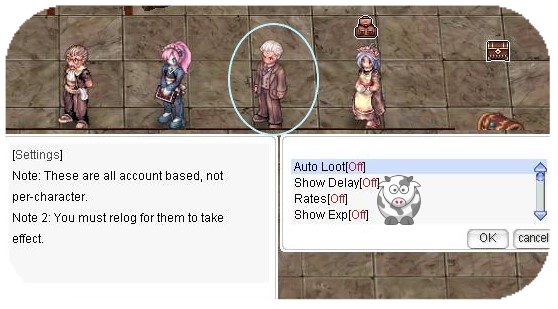
Some commands can be enabled at NPC Settings in our main office for automatic activation each time you log in, and changes made in Settings NPC now apply immediately (no relog required).
General Information
Login Settings Scope
Some commands on this page are integrated with the Settings NPC and support scoped persistence.
| Scope
|
Aliases
|
Meaning
|
| Character
|
C, char, character
|
Saved only for the current character.
|
| Game Account
|
A, G, account, acc, game
|
Saved for the current game account.
|
| Master Account
|
M, master
|
Saved for the linked master account.
|
Default scope in Settings NPC: Game Account.
Default scope on manual command usage: Character.
Effective priority: Character > Game Account > Master Account.
Scoped settings currently cover:
@autoloot, @alootset/@als, @showdelay, @rates, @showexp, @showzeny, @uptime, @noask, @time, @allowks/@noks, @listenbg, @killcounter/@kc, @noattack, @nodrop, @noshare, @ltp, @silentpet, @hidepet, @hidepet2, @hideelem, @hidehom, @hideabr, @hidebionic, @hideplayer, @hidewarg, @hidemount, @hideoutfit, @hidehateffect, @hideflamegiant, @hideconfig, @madomode, @daynight, @utc, @langtype, @noresize, @expandstyle, @hidemobshout.
| Command
|
Description
|
| @commands
|
Displays all available text commands.
|
| @rates
|
Displays the server's EXP/Job/Drop rates.
|
| @cooldown
|
Displays your instance cooldown timers.
|
| @time
|
Displays the current server time.
|
| @uptime
|
Displays how long the server has been active.
|
| @exp
|
Displays your current Base/Job levels and exact EXP progress percentages.
|
| @jailtime
|
Displays your remaining jail time (if jailed), including time left until release.
|
| @hominfo
|
Displays homunculus information and combat-related details for quick status checks.
|
| @homstats
|
Displays detailed homunculus stat values for growth/performance tracking.
|
| @showdelay
|
Displays Cast Delay or Cooldown for skills, requires Skill Failure Display option to be enabled.
|
| @eventinfo
|
Displays next Hourly Event and time until next Happy Hour and Seasonal Event.
|
| @woeseinfo
|
Displays castle and time until next WoE.
|
| @ltp
|
Marks your last point after porting on the mini-map.
|
| @utc
|
Use @utc to set your timezone (this is displayed on MVP Tombs and @time command).
|
| @langtype
|
Sets your preferred language (same values and modes as @langtype: char/account/both/inherit). Also integrated with scoped login settings.
|
| @channel @main
|
Displays full channel command help (join/list/leave/bind/unbind and management options depending on permissions).
|
Database Commands
| Command
|
Example
|
Description
|
| @iteminfo @ii
|
@ii 573
|
Displays information about an item (Name, ID and sell price).
|
| @iteminfo next @ii next
|
|
Displays the next @iteminfo/@ii page.
|
| @whobuy @wb
|
@wb 573
|
Displays Buying Stores containing that item.
|
| @whobuy2 @wb2 @whobuys2
|
@wb2 573
|
Displays Buying Stores containing that item using the extended shop-search output.
|
| @whosell @ws
|
@ws 573
|
Displays Vending Stores containing that item.
|
| @whosell2 @ws2 @whosells2
|
@ws2 +7 573 [4001]
|
Displays Vending Stores containing the item, with optional refine and card filters.
|
| @whichnpcsell @wn
|
@wn 573
|
Displays NPC shop locations for an item.
|
| @whodrops @wd
|
@wd 573
|
Displays which mobs drop an item at which rate.
|
| @mobinfo @mi
|
@mi 573
|
Displays a mob's stats and item drop rates.
|
| @mobinforate @mobinfomode
|
@mobinforate personal
|
Controls which drop-rate mode @mobinfo shows: base/server rates, personal/effective rates, or default (inherit server setting).
|
| @whereis @wi
|
@wi 573
|
Displays where a mob spawns (regular spawn only).
|
General Commands
| Command
|
Example
|
Description
|
| @go
|
@go 0
|
Teleports you to the specified town (use alone for town list).
|
| @return @load
|
-
|
Teleports you back to your save location.
|
| @die
|
-
|
You die.
|
| @lastwarp @lw
|
-
|
Teleports you to the last location you visited via Warper NPC.
|
| @refresh
|
-
|
Reloads displayed positions (removes position lag errors).
|
| @noks @allowks
|
-
|
Toggles kill-steal protection, preventing other players from damaging mobs who hit you or were hit by you.
|
| @noask
|
-
|
Prevents party invitations.
|
| @battlestats @bs
|
-
|
Displays in-depth character stats.
|
| @battlestats2 @bs2
|
-
|
Displays in-depth defensive character stats.
|
| @bsc
|
-
|
Displays an advanced bonus/stat breakdown (including offensive/defensive bonus categories and derived values).
|
| @navi
|
@navi prontera 55 55
|
Enables navigation to lead you to coordinates on the selected map.
|
| @navi2
|
@navi2 prontera 55 55
|
Enables navigation to coordinates and opens the navigation window.
|
| @shop
|
@shop ID/Type
|
Opens a player shop directly. You can find this command on the homepage market pages.
|
| @market
|
@market "<Title>" "<Message>"
|
Creates your Market clone with custom title/message (subject to map/usage restrictions and server config).
|
| @marketkill
|
-
|
Removes your active Market clone and starts its reuse delay timer.
|
| @showexp
|
-
|
Displays gained EXP per kill.
|
| @shopjump
|
@sj 55 55
|
Teleports you to the shop located at those coordinates.
|
| @showzeny
|
-
|
Displays gained zeny.
|
| @killcounter mobid killcounterlist
|
@kc 1973 1
|
You can count 5 different mobs at the same time. Use @kc >mobid< >1-5< to set a list slot.
|
| @killcounter reset
|
@kc reset 1
|
Resets one killcounter list. If you use just "@kc reset", it resets all 5 lists.
|
| @killcounter status
|
@kc status
|
Shows the current kill status of your whole list.
|
| @ping
|
-
|
Displays your ingame ping.
|
| @daynight
|
@daynight 0
|
Sets your personal day/night display mode. Options: 0 = default cycle, 1 = permanent day, 2 = permanent night.
|
| @activity
|
-
|
Shows your current amount of Fashion Points.
|
| @help @h
|
@h showdelay
|
Shows information about any command, if available.
|
| @hideconfig
|
-
|
Hides login settings messages.
|
| @kickmyvendors @kmv
|
-
|
Kicks all active vendors of the corresponding master account.
|
| @autotrade @at
|
-
|
Keeps a vending stall active while logged off. Logging in again deactivates automatic vending.
|
| @unequipall
|
-
|
Takes off all gear you are wearing.
|
| @clearfav
|
-
|
Clears all inventory favorite marks and also forgets remembered favorite storage entries.
|
| @lockjob
|
-
|
Toggles the Job Changer to not offer job changes for your character.
|
| @noresize
|
@noresize G
|
Disables resized NPC chat windows while saving state. Supports optional scope suffix (C/A/G/M); A and G are both Game Account.
|
| @settings
|
-
|
Summons the Settings NPC next to you (overview + scope management; changes there apply immediately).
|
| @setrates
|
-
|
Summons the EXP-Settings NPC next to you.
|
| @bank
|
-
|
Summons banker Bowsette next to you and opens the bank window.
|
| @spellbook
|
-
|
Shows Reading Spell Book info (Warlock only).
|
| @me
|
@me sits down
|
Lets you talk directly in third person.
|
| @pettalk
|
@pettalk sniffs on the ground
|
Lets your pet talk.
|
| @homtalk
|
@homtalk sniffs on the ground
|
Lets your homunculus talk.
|
| @garmentlayer
|
-
|
Summons a clone of you with garment layer priority reversed.
|
| @hateffect
|
-
|
Summons a clone of you that lets you preview costume effects (excluding body-related effects).
|
| @hold
|
-
|
Movement by clicking will be ignored.
|
| @noattack
|
-
|
Autoattack action will be ignored (your character will still stand within range when clicking an enemy).
|
| @hidemobshout
|
-
|
Makes monsters shout their skill at the end of the cast instead of at the start.
|
| @treasureradar @tr
|
-
|
Shows remaining treasure chests on the map.
|
Commands to Hide/Show Specific Features (Visual only)
| Command
|
Example
|
Description
|
| @hideunits @hideunit
|
-
|
Toggles hide/show for all supported unit categories at once (players, pets, homunculi, elementals, ABR, bionics).
|
| @hideplayer
|
-
|
Other players will no longer be shown.
|
| @hidepet @hidepets
|
-
|
Pets will no longer be shown.
|
| @hidepet2
|
-
|
Hides all pets except your own.
|
| @silentpet @silentpets
|
-
|
Pets will no longer talk or have emotions.
|
| @hidewarg
|
-
|
Hides Windhawk warg.
|
| @hidemount
|
-
|
Swordsman classes only. Hides your mount. Known issue: mount button may disappear (use @unmount).
|
| @unmount
|
-
|
Swordsman classes only. Helps you dismount if your mount is hidden with @hidemount.
|
| @hideabr
|
-
|
Hides Meister ABR machine summons.
|
| @madomode
|
@madomode 3
|
Changes Mado Gear appearance for you and others (does not work in PvP maps).
Options: 0 = Default, 2 = Modern, 3 = Invisible (Default in PvP), 4 = Invisible (Modern in PvP)
|
| @hidebionic
|
-
|
Hides Biolo Bionic summons.
|
| @hidehom
|
-
|
Hides Alchemist Homunculus.
|
| @hideelem
|
-
|
Hides Elemental Master summons.
|
| @hideoutfit @hideoutfits
|
-
|
Turns off all headgear/garment sprites on player characters.
|
| @hidehateffect @hidehateffects
|
-
|
Turns off all headgear/garment effects on player characters.
|
| @expandstyle
|
-
|
Turns on expanded alternate outfit styles.
|
| @hideflamegiant
|
-
|
Turns off only the Flame Giant costume sprite.
|
Loot-related Commands
| Command
|
Example
|
Description
|
| @autoloot @al
|
@al 5 G
|
Automatically loots drops below the selected rate. Optional trailing scope suffix can be used for settings persistence.
|
| @nodrop
|
-
|
Ignores floor items.
|
| @aloottype
|
@aloottype +4
|
adds an item type to always autoloot, - removes/blacklists an item type.
Types: 0 = Healing, 2 = Usable, 3 = Etc, 4 = Armor, 5 = Weapon, 6 = Card, 7 = Pet Eggs, 8 = Pet Accessories, 10 = Ammo
| @alootid
|
@alootid +573
|
Adds item to your autolootid list. You can chain commands with "|". E.g.: @alootid reset|+573|+574
|
| @alootid -573
|
Removes item from your alootid list.
|
| @alootid reset
|
-
|
Clears your autoloot item list.
|
| @nolootid
|
@nolootid +573
|
Removes an item from autoloot. You can chain commands. E.g.: @nolootid +573|+574
|
| @nolootid reset
|
-
|
Clears your noloot item list.
|
| @restock
|
|
Restock lets you automatically draw a set of registered items from the currently opened Storage.
|
| @restock list
|
-
|
Lists currently registered restock items.
|
| @restock reset
|
-
|
Erases your current restock list.
|
| @restock bg
|
-
|
Restocks BG items.
|
| @restock woe
|
-
|
Restocks WoE items.
|
| @storeall
|
@storeall 4
|
Stores all items into an opened storage by type.
Type list: all=-1, healing=0, usable=2, etc=3, armor=4, weapon=5, card=6, petegg=7, petarmor=8, ammo=10, shadowgear=12
|
| @getall
|
@getall 4
|
Moves all items from opened storage into inventory by type.
Type list: all=-1, healing=0, usable=2, etc=3, armor=4, weapon=5, card=6, petegg=7, petarmor=8, ammo=10, shadowgear=12
|
| @stockall
|
@stockall 4
|
Moves all items from cart to inventory by type.
Type list: all=-1, healing=0, usable=2, etc=3, armor=4, weapon=5, card=6, petegg=7, petarmor=8, ammo=10, shadowgear=12
|
| @dropall
|
@dropall 4
|
Drops all items from inventory except equipped or favorited items, by type.
Type list: all=-1, healing=0, usable=2, etc=3, armor=4, weapon=5, card=6, petegg=7, petarmor=8, ammo=10, shadowgear=12
|
| @alootconfig @alc
|
-
|
Calls dialog to save current loot settings (@autoloot, @alootid, @nolootid) into an account-wide set.
|
| @alootset @als
|
@als 1 A
|
Loads a saved autoloot set. Optional trailing scope suffix can be used for settings persistence.
|
| @noshare
|
-
|
Disables receiving loot from party share.
|
| @nosellall
|
-
|
Removes the "Sell All" option from tool dealers.
|
Party Commands
| Command
|
Example
|
Description
|
| @party
|
-
|
Creates a party.
|
| @invite
|
@invite Icecold
|
Invites a character to your party (Party Leader only).
|
Guild Commands
| Command
|
Example
|
Description
|
@guild
or
ALT + g
|
@guild MuhRO
|
Creates a guild (requires 1 Emperium).
|
| @guildinvite
|
@guildinvite Icecold
|
Invites a character to a guild.
|
| @changegm
|
@changegm Icecold
|
Transfers guild ownership.
|
| @breakguild
|
-
|
Disbands a guild (Guild leader only, all members must be expelled beforehand).
|
Battleground Commands
| Command
|
Example
|
Description
|
| @guildskill
|
@guildskill EC
|
Uses Guild/BG leadership skills by shortcut (EC/RS/RG/BO), with leader checks and normal skill-usage restrictions.
|
| @guildskillinfo
|
-
|
Displays cooldown status for guild/BG leadership skills to help timing pushes/defenses.
|
| @leader
|
@leader Icecold
|
Transfers Battleground team leadership to another teammate in your current BG team.
|
| @reportafk
|
@reportafk Icecold
|
Reports and removes an AFK teammate from Battleground (leader-only if enabled by config).
|
| @order
|
@order Push left
|
Broadcasts tactical orders to your Battleground team (or guild context where applicable), leader-only.
|
| @listenbg
|
@listenbg 2
|
Controls BG announcement reception: 0 = on, 1 = off, 2 = Happy Hour only.
|
| @bgrank
|
-
|
Displays Battleground ranking leaderboard and your current BG points.
|
PvP
| Command
|
Example
|
Description
|
| @duel
|
@duel Icecold
|
Invites a character to a duel.
|
| @accept
|
-
|
Accepts a duel invitation.
|
| @reject
|
-
|
Rejects a duel invitation.
|
| @leave
|
-
|
Leaves duel status.
|
| @joinbg
|
-
|
Joins the Battleground queue.
|
Client featuring commands
| Command
|
Example
|
Description
|
| !ping
|
|
Shows latency.
|
| !vsync
|
-
|
Unlocks FPS if playing with DirectX7.
|
| @lgp
|
-
|
Enables/Disables LGP.
|
| @square <on/off/1-14>
|
-
|
Displays a square around the character. Size can be changed.
|
| @circle
|
-
|
Displays a circle around the character.
|
| @aoes
|
-
|
Displays colored skill areas: Storm Gust, Lord of Vermillion, Meteor Storm.
|
Event Commands (if active)
| Command
|
Example
|
Description
|
| @dicebet
|
@dicebet Icecold 100000
|
Sends a dicebet invitation to another player with the selected zeny amount.
|
| @acceptdb
|
-
|
Accepts a pending dicebet invitation.
|
| @declinedb
|
-
|
Declines a pending dicebet invitation.
|
| @resetdb
|
-
|
Resets your current dicebet invitation state.
|
Discord Commands
The following commands can be used in any channel on our Discord:
| Command
|
Description
|
| /download
|
Shows download links for the game client and gray map.
|
| /kickvendor
|
Kicks one of your selected vendors.
|
| /mypunish
|
View your current punishment status
|
